Agentic AI vs. Advisory AI in Compensation Software: What's the Difference?

Last updated: October 2026.
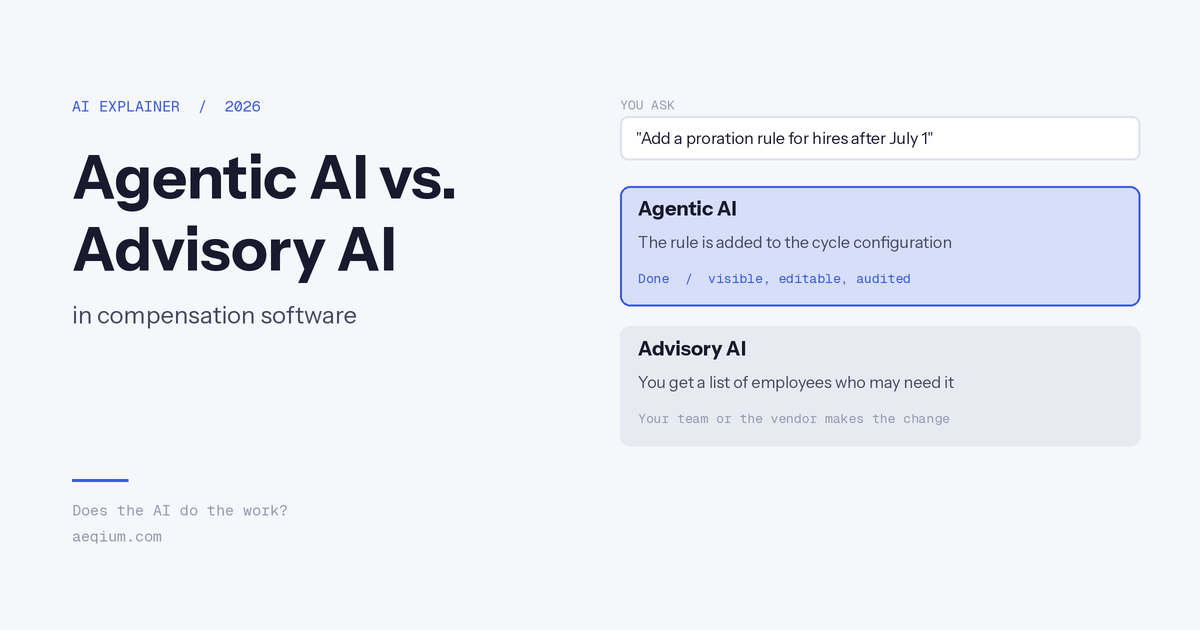
Agentic AI in compensation software does the work: it configures cycles, changes rules, and runs analyses from plain-English instructions. Advisory AI tells you what to do: it recommends actions, flags issues, or surfaces data, then hands the work back to your team or the vendor. Most compensation platforms now market AI, but nearly all of it is advisory. The difference decides whether AI reduces your team's workload or adds to their to-do list.
The two types at a glance
| Agentic AI | Advisory AI | |
|---|---|---|
| What it does | Executes the work you describe | Recommends what to do |
| Who finishes the task | The AI | Your team or the vendor |
| Example request | "Add a proration rule for hires after July 1" | "Which employees might need proration?" |
| Output | A changed configuration or a finished analysis | A suggestion, alert, or report |
| Effect on workload | Removes steps | Adds review steps on top of existing work |
| Effect on cost of change | Changes happen without vendor tickets | Changes still route through admins, specialists, or the vendor |
What each looks like in a compensation cycle
Setting up a cycle
- Agentic: "Set up a promotion cycle with a 2% budget, eligibility for employees with 12+ months in role, and approval by region." The AI builds it.
- Advisory: The AI suggests a budget or eligibility rules, and your team or the vendor configures the cycle.
Changing something mid-cycle
- Agentic: "Exclude employees on leave from bonus eligibility." The rule changes immediately and stays visible in the configuration.
- Advisory: The AI flags employees on leave, and someone files a change request.
Answering a leader's question
- Agentic: "Which managers in EMEA are over budget, and by how much?" The AI answers from live cycle data.
- Advisory: The AI points to a dashboard, and your team exports and builds the answer.
Updating pay ranges
- Agentic: "What would it cost to move engineering to the new midpoint?" The AI calculates it against your draft bands.
- Advisory: The AI shows market data, and your team models the cost in a spreadsheet.
Why the difference matters
- Time: Agentic AI removes configuration and reporting work. Advisory AI informs it, but the work still happens.
- Cost of change: If the AI can't make the change, someone else does. With vendor-led platforms, that's often billed.
- Control: Agentic AI lets comp teams own their programs instead of waiting on HRIS teams or vendors.
- Speed in a live cycle: Mid-cycle changes are where cycles slip. AI that executes keeps the cycle moving.
What good agentic AI needs
Agentic AI changes real compensation data, so the guardrails matter as much as the capability:
- Visible changes: Every change the AI makes should appear in the configuration, where your team can read and edit it.
- Audit trail: A full record of what changed, when, and who requested it.
- Permissions: The AI should only act within the requesting user's role-based access.
- Data security: The AI should run inside the vendor's own environment, with no customer data used to train models.
How Aeqium approaches it
Aeqium's AI is agentic:
- Assist executes configuration changes you describe in plain English, such as eligibility rules, proration, approval chains, and bonus pools.
- Analyst answers questions against live cycle and compensation data, from budget status to equity gaps.
- Ask AI on bands models range changes during market pricing.
- Every change is visible and editable in the configuration, with a full audit trail, and Assist only acts within the requesting user's role-based access.
- AI runs inside Aeqium's own AWS environment, and customer data is never used to train models. Aeqium is SOC 2 Type 2 certified and GDPR compliant.
- No cost to change: Changes through Assist carry no change fees, services hours, or service contracts.
For a comparison of how vendors approach AI, see the best AI compensation planning software.
How to test AI in a vendor demo
- Ask it to make a change. For example, "Add an approval step for promotions over 15% in EMEA." See whether the configuration changes, or whether you get instructions.
- Ask a mid-cycle question. For example, "Which managers are over budget?" See whether it answers from live data.
- Check the trail. Ask where the change is recorded and who can see it.
- Ask what happens when the AI can't do it. Find out who makes the change instead, and whether it's billed.
Frequently asked questions
What is agentic AI in compensation software?
Agentic AI executes compensation work from plain-English instructions: configuring cycles, changing rules, and running analyses, rather than only recommending what to do.
What is advisory AI in compensation software?
Advisory AI recommends actions, flags issues, or surfaces data, and leaves the work to your team or the vendor.
Is agentic AI safe for compensation data?
It can be, with the right guardrails: visible and editable changes, a full audit trail, role-based permissions, and AI that runs inside the vendor's own environment without training on customer data.
Which compensation software uses agentic AI?
Aeqium's Assist and Analyst execute configuration and analysis from plain-English instructions. Most other compensation platforms use advisory AI. See our AI compensation software comparison.
Does agentic AI replace compensation teams?
No. It removes operational work, so comp teams spend their time on philosophy, judgment, and advising leaders.